Speech Bubbles Font: A Game-Changer for Campaign Design
It was a typical Monday morning, and I was deep into finalizing the visuals for our upcoming product launch. The campaign needed to stand out in a crowded feed, grab attention quickly, and communicate the message with clarity. That’s when I stumbled upon Speech Bubbles—a font that would change everything.
The Power of Visual Language
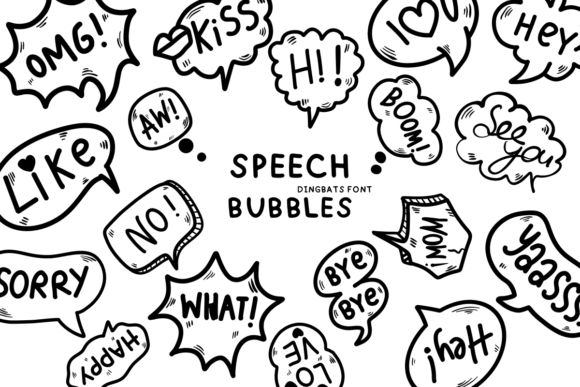
Speech Bubbles is more than just a font; it's a visual language. With its playful, bubble-like design, it brings a sense of fun and approachability to any project. It's perfect for campaigns that aim to be both creative and engaging. The font's unique style makes it ideal for digital marketing, where first impressions matter more than ever.
As I started testing different text elements on my mockups, I realized how much Speech Bubbles could enhance readability and visual appeal. Its rounded edges and whimsical curves create a friendly vibe that aligns well with brand identities looking to connect with younger, more casual audiences.
Real-World Application: A Product Launch Campaign
I was working on a week-long social media campaign for a new line of eco-friendly home goods. The goal was to build anticipation and drive traffic to our online store. Each day featured a different product highlight, and I needed a font that could work across multiple platforms without losing its charm.
Speech Bubbles fit seamlessly into this workflow. I used it for headlines, callouts, and even some decorative elements. Its versatility allowed me to maintain a consistent look while keeping things fresh and dynamic. For instance, I paired it with a clean sans serif font like Montserrat for better readability on mobile screens.
One of the most effective uses was in our Instagram carousel posts. The font added a playful touch to the headlines, making each post feel like a conversation rather than a sales pitch. It helped break up the content and made the message feel more personal and inviting.
Designing for Different Platforms
When designing for various platforms, it's essential to consider how the font will appear on different devices and backgrounds. Speech Bubbles performs exceptionally well on both light and dark backgrounds, which is a huge plus for digital assets that need to adapt to different environments.
For YouTube thumbnails, I used Speech Bubbles to highlight key phrases like “Limited Time Offer” and “Join the Movement.” The font’s boldness and legibility ensured that the message was clear even at small sizes. On Pinterest, I applied it to pin titles, creating a cohesive look across the board.
One thing I learned early on was the importance of checking the font’s file formats and licensing. Speech Bubbles comes with several styles and weights, which gives designers flexibility. It also supports multilingual characters, making it a great choice for global campaigns.
Font Pairing & Brand Consistency
While Speech Bubbles can stand alone beautifully, pairing it with complementary fonts can elevate the overall design. I often use it alongside a modern sans serif like Futura or a classic serif like Garamond for contrast and balance.
For email banners and landing pages, I found that using Speech Bubbles as a display font worked best. It draws the eye and adds a touch of personality without overwhelming the reader. Supporting text, on the other hand, benefits from a simpler, more readable typeface.
Consistency is key in branding, and Speech Bubbles helps maintain that consistency across all campaign materials. Whether it's a webinar banner, a course launch graphic, or an online shop promotion, the font keeps the brand voice recognizable and approachable.
Readability Tips for Digital Assets
When working with Speech Bubbles, it's important to keep readability in mind, especially for fast-scrolling feeds and small previews. I recommend using it for short headlines, callouts, and labels rather than long blocks of text.
Testing the font on different screen sizes and resolutions is crucial. I often check how it looks on mobile devices, ensuring that it remains legible even at smaller sizes. Dark backgrounds can sometimes make the font harder to read, so I always test against both light and dark themes.
Another tip is to use Speech Bubbles in combination with high-contrast colors. This ensures that the text stands out and remains visible, even in busy or cluttered designs.
Final Thoughts on Using Speech Bubbles
Working with Speech Bubbles has been a revelation. It adds a unique flair to campaign visuals without sacrificing clarity or professionalism. From social media graphics to email banners, this font has proven to be a versatile and reliable tool in my design toolkit.
Whether you're launching a new product, promoting a seasonal sale, or building a branded content series, Speech Bubbles offers the creativity and functionality needed to make your message shine. It’s a font that speaks volumes—and that’s exactly what your audience needs to hear.